Follow Me lets one device lead all the others. Start Play Mode on your phone, and the tablet on the stand and the laptop by the mixer open the same setlist at the same song. Change song on the phone and they change with it; start auto-scroll and they scroll along; tap a section and they go to it. There is nothing to pair and nothing to set up per device: if you are logged in, online and Follow Me is on, it follows.
Turning it on
Follow Me is one switch for your account, in two places:
- Settings > Features > Follow Me across your devices (in a band it reads Follow Me with your band).
- Inside Play Mode: open the gear (the setup sheet) and flip Follow Me under its own heading. Handy when you are already on stage and want the second screen to catch up.
With the switch off, a device neither leads nor follows. Someone else pressing Play does not open Play Mode on it, and your own Play Mode stays your own.
Flipping it on inside Play Mode makes that device the leading one right away. Flipping it off on the leading device ends the session, so every follower leaves Play Mode. Flipping it off on a follower stops following on that device at once: it stays on the song it is on, and the leading device carries on without it.
Which device leads
Whichever device you press Play on leads. There is no setting for it. Start Play Mode on the phone and the phone leads; walk over to the tablet and press Play there and the tablet takes over, while the phone quietly becomes a follower.
The Play Mode header says which one you are holding: Leading on the device that leads (once another device has the app open, so a lone device shows nothing), Following on the ones that follow.
Take the lead
Someone else can take over in the middle of a set, without leaving Play Mode. On a device that is following, tap Following in the header and choose Take the lead. That device leads from the song it is on, and everyone else follows it. On the device that led until then, the Following chip lights up amber for a moment, so a glance at the header shows who leads now.
Pass the lead
The leading device can hand the lead over too. Tap Leading in the header: the menu lists the bandmates who are following right now, as Pass the lead to Kjeld. Pick one and that device leads at once, from the song the band is on. When nobody is following yet, the menu says so. Your own devices show by kind, as your iPad or your iPhone (a computer is your Mac or your computer).
In a band, Leaders and Members can lead, take the lead and be passed it. Viewers and Guests follow, as long as their own Follow Me is on.
What a follower can do
A follower is a full Play Mode, not a mirror. Text size, the metronome, chord diagrams and your capo all work as usual on each device. The metronome is each device's own: starting it on the leading device does not start it on the followers.
Auto-scroll follows, and every sheet lands together. Start auto-scroll on the leading device and every follower starts scrolling too; stop it and they stop. Each follower paces its own sheet to reach the bottom at the same moment as the leading device, so a device with chords hidden, or bigger text, or a smaller screen, reaches the last line with the others. That is smart speed on the leading device's clock, and like smart speed it steps aside when you have set your own speed for a song: your speed leads on your device. Tapping play or pause on a follower only changes that device, until the leading device's next play or pause.
Change song on a follower (swipe, tap an edge, use the chevrons or the song picker) and it stops following for the moment, so you can glance at the next song while the leading device is still on this one. The header says Paused and a pill at the bottom says Following paused:
- Tap the pill (or its round button, Rejoin the leading device) to jump back to the leading device's song, at the spot it is reading. A device that joins mid-song lands there too.
- Do nothing and the follower rejoins on its own the next time the leading device changes song.
- Tap the × next to the pill (Stop following on this device) to stop following on that device for the rest of the session. It stays where you put it until someone presses Play again.
Moving around inside the song does not pause anything. Scroll back to read a verse, turn a page, or tap a section of your own, and the follower stays Following: the leading device's next song, section or page takes it along again.
The countdown follows. When the leading device reaches the end of a song and the end-of-song pill starts counting down, every follower shows the same countdown, synced to it, with the next song's title, capo and key. Nobody advances on their own: the leading device's move lands and everyone follows it. A follower's own pill (when it reaches its own bottom) waits for a tap instead of counting down.
Sections and pages
Tap a section and the band goes there. On the leading device, tap a section in the Sections list (in the sidebar on a wide screen, or the Sections tab of the dock on a phone), or step to the next or previous section with the . and , keys (in Fit, below, those keys turn the page instead). Every follower goes to that section on its own sheet, and the section lights up for a moment so everyone can find it. That is the "back to the chorus" call from the singer, without anyone hunting for the line. Like any move by the leading device, it ends a follower's pause.
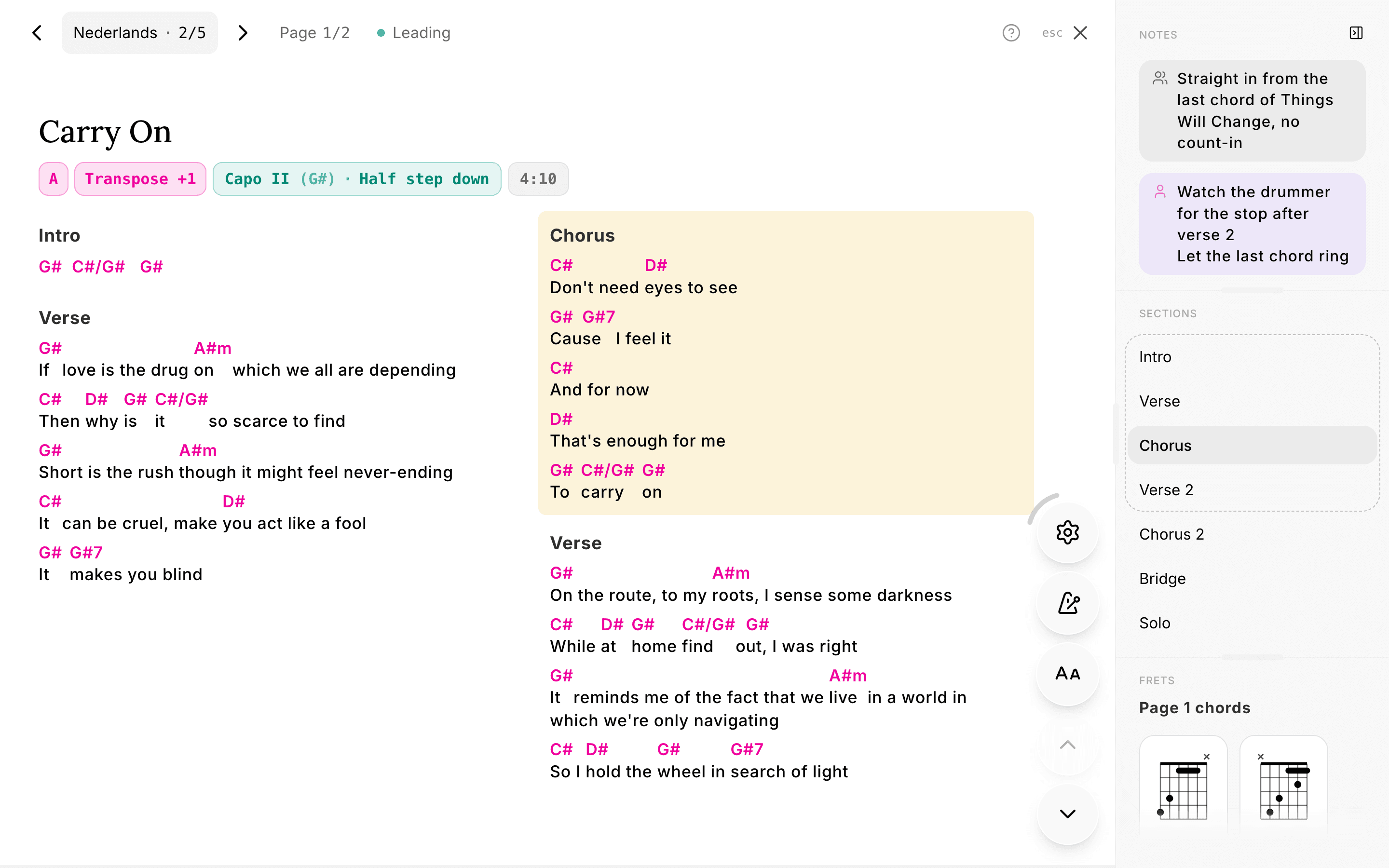
Pages follow by section, not by number. With Fit to screen on (the gear, or the Text button in the controls), Play Mode fits a song on one screen and turns pages when it is too long. When the leading device turns a page (with a pedal, a swipe or the keyboard), every follower turns to the page that holds the same section on its own screen. An iPad and a laptop seldom split a song into the same pages, so the laptop's page 2 might be the iPad's page 3: what lines up is the section, and that section lights up on the follower. A device that does not use Fit (a phone, which is too narrow for it) scrolls to that section instead.
A device in Fit does not auto-scroll, because a fitted song has nothing to scroll. So if the leading device auto-scrolls and a follower is in Fit, the follower changes song with it but turns its pages only when the leading device turns a page or taps a section.
The break between sets
On a setlist split into sets, the leading device steps off the last song of a set onto a Break screen, and every follower lands on it too. Nobody is left looking at a song that finished ten minutes ago, and nobody is dropped into the next set without warning. When the leading device taps Start Set 2 (or the next set's own name), the band goes with it.
Leaving
- Exit on the leading device and every follower exits with it.
- Exit on a follower and only that device leaves: press Esc or the close button, or on a phone pull the sheet down from the top. The leading device keeps playing, and that device stays out. That is how you step out mid-rehearsal to write something under My notes.
- Back in: open the same setlist and press Play Setlist. You follow again, at the song and the spot the leading device is on. Pressing Play never takes the set over; that is what Take the lead is for.
Good to know
-
The status chip names who you are following. A bandmate is named; one of your own devices says which kind it is (Following your iPad), because a tab you left open on a laptop is a device like any other and will lead if it is still running.
-
Requires an internet connection, on the leading device and on every follower. Follow Me travels through Fretlist's servers. Offline, Play Mode still works on each device; they just do not talk to each other. Making this work on a stage without internet is the end goal, but not there yet.
-
No venue WiFi? Use a hotspot. Nothing here needs the venue's network. If your phone has signal, turn on its hotspot and put the tablet on it; Follow Me works the same.
-
If the leading device disappears (a dead battery, a closed app), followers keep the last song up and stop reacting after a few minutes. Press Play on another device to carry on from there.
-
The switch is one setting for your account. Flip it on the phone and Settings on the tablet shows it flipped, live. Off means off on all your devices: none of them leads or follows. The same now goes for "Show chord diagrams" next to it.
-
An editor is never interrupted. A device sitting on the song editor or the new-song page does not jump into Play Mode.
Related
- Performing with Play Mode: everything else on the stage view
- Installing the app: put Fretlist on the tablet that lives on the stand